Web 2.0 Tool: myHomework
Executive Functioning Skills
As I finished my first year teaching special education at the high school level, an area that each of my students needed to improve on was their executive functioning skills. Although I completed binder and planner checks regularly, it was difficult for my students to gain their organizational skills independently. During the school year I kept track of homework, projects, and assessments dates for each of my students' classes. However, I felt that I was reminding the students too much about due dates and without my prompting they would have completely forgotten. One of my goals for the summer was to find an easy to use app that I could introduce to my students that could be used as an online planner.
myHomework App
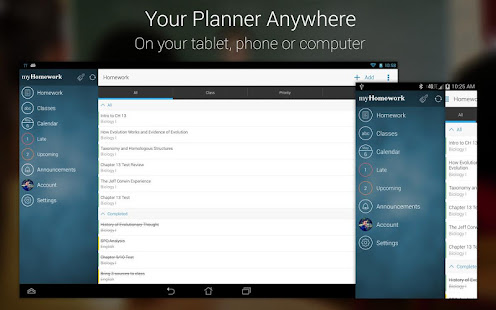
I believe I found an excellent application that will help my students not only gain their executive functioning skills, but help them organize and plan during the school year. Check out my screencast to find out how to use the website.
myHomework Screencast
As seen on the screencast, there is an app for both students and teachers. I plan on creating a teacher class for each of my co-taught classes in order to encourage students to use the website. I believe this will help all students at my high school improve their organizational skills and have all their information in one central location.
Student Website
Teacher Website
Things I'm Excited About
 |
| Image Source |
myHomework App
 |
| Image Source |
I believe I found an excellent application that will help my students not only gain their executive functioning skills, but help them organize and plan during the school year. Check out my screencast to find out how to use the website.
myHomework Screencast
As seen on the screencast, there is an app for both students and teachers. I plan on creating a teacher class for each of my co-taught classes in order to encourage students to use the website. I believe this will help all students at my high school improve their organizational skills and have all their information in one central location.
Student Website
Teacher Website
Things I'm Excited About
| Image Source |
- I enjoy how homework assignments/assessments can be organized in a list or through a visual on the calendar
- Teachers can create a classroom page and add assignments that are linked to the student account
- Reminders can be set to prompt students to begin their assignments
- It is free and students can sign up through their school gmail account
- The classes and assignments can be color coded
- Students can categorize each assignment by its priority
- There is an option to set up classes through block scheduling
- It's a new tool that allows students to be creative and gain independence
Great screencast! I am absolutely loving this web 2.0 tool. I know most schools give out planners for students to keep their homework and due dates organized, but it still doesn't work that well. A lot of teachers also try to take time from learning each day to give students a chance to write down the homework assignment AND check the student's planner. Then the excuse can be "I forgot my planner at school" or "I lost my planner". Well using this app means you have a planner on you at all times! Plus, if its an app on their phone, chances are students may be more into it and utilize it better than a standard, boring planner. I also like the fact that the teacher can add important dates such as big tests and project deadlines while still giving the students an opportunity to be independent and add their own homework assignment. I think I would definitely use this in my class one day.
ReplyDeleteThis is a great resource! Thank you for so clearly explaining it in your screencast. I might use it for myself! I agree that executive functioning is an area most special education students and many general education students struggle with! Most teenagers are regularly on their phone so it's great to have a tool that can be used from their device.
ReplyDeleteKatie - Loved reading about the myHomework app! Even as an RD, I can see how I could implement this idea with my clients that I work with virtually. I do work with groups (whether it's a group of clients on similar weight loss journeys, clients working on maintaining their current weight, or sometimes those working on losing weight in efforts to help manage their hypertension, or pre-diabetes). Sometimes I give challenges to my groups overall, sometimes on an individual basis. I could see using this to help keep myself organized with what challenges or assignments I'm giving to each client in the separate groups. A great way to stay on top of your own work, but to also help those you're working with (or students you are teaching) keep track of the work needed to be done. Thank you for sharing!
ReplyDeleteAnother new tool for me! Thanks for demonstrating not only the student account but also the teacher account. The screencast was easy to follow and I appreciated your honesty about still being new to the program. It was also great to see a section of your post dedicated to things you are excited about! Yay!
ReplyDelete